13 December 2020

Salvaged posts on Shoplifting Godot

 Originally posted at spakegames.com. Much of the content is mixed with details on another game.


 8/16/20: 

After my last blog post, it hit me: the year is half over, and I was still adding new features to my main project (still working on a new name for it). So, I re-examined my project against the goals I set for it:

  • Make something simple.
  • Make something quickly.
  • Make everything except the game engine and audio myself.
  • Make a complete game.
  • Release it before the end of the year 2020.

I've removed the goal of necessarily charging money for the game once it's finished. The platform I'm going to release on, Itch.io, has an optional payment option that I'll probably use instead. Still, I'm not expecting to make much (if any) money.

The reasoning behind this is straightforward: I want a 30 second timer in my game, and I don't believe I'll have time to add unlocks or other incentives for repeated play.

I've wanted a timer in my game ever since I decided on the endgoal: Get to the end before your lover dies. However, for most of development, I couldn't decide on what the timer length should be. 1 minute? 5?

Until recently, I planned for up to 5 bosses to be in my game. Additionally, I'm planning on there only ever being 5 levels total: a starting area, 3 randomly selected levels from a larger pool of pre-constructed options, and a 5th final area with a bossfight. Within this structure, a 1 minute timer that stopped when you reached the final boss seemed most appropriate.

It was the 5 planned bosses, with the potential complexity they would add, which caused me to want at least 1 minute for players to experiment. However, it's on these 5 bosses that most of my time was being spent. And, only 1 was finished. So, I decided to cut every boss except for the one that was finished.

My pool of monsters and traps to learn is small, and there is no barrier in levels to keep players from rushing through everything to get to the end. Given this, with the removal of all but 1 boss I decided I wanted to focus the player on speed over doing everything. This is a cheap way to try and force interesting choices, and it's usually not a good design decision when made from desperation or a need to cut content.

I still plan to stop the in-game timer when the player gets to the end. So, I need a timer that is long enough for the player to get through 4 levels, but just short enough to force the player to move quickly. If 1 minute was necessitated by random, complex (comparatively), and unskippable boss fights, it seems reasonable to me to find the new time by cutting 1 minute in half. 30 seconds it is.

With the timer decided and all but 1 boss cut, I realized I'd implemented essentially everything my game will require. So, I now consider the game to be out of Alpha and into early Beta. My next steps are 5:
  • Create new, 1 color, simplified sprites and animations for every object in the game.
  • Create multiple tilesets.
  • Find basic sound assets.
  • Compile art, sound, and game assets into a basic playable version to beg people to try.
  • Create a side project to learn how the Godot UI layer works.

Wait, wait, what was that last one?

It's an unfortunate truth that I know very little about implementing UI (menus) in Godot. This is a big problem, as I'd like to present the player with sound and input settings at the very least. So, I've started a new project called Shoplifting Godot.

This new project is not an original design, thankfully. I'll be attempting to recreate a game from 1979 called "Shoplifting Boy" in Godot, and I've selected this game for 2 reasons: It's one of the simplest games ever made (though it was advanced for the time, I'm sure), and I've never created a decent design for a stealth game. There's plenty you can learn just from seeing Shoplifting Boy in action, but I'm curious if there's more I can learn through the remaking process.

I learned about Shoplifting Boy completely by accident thanks to YouTube recommendations (cut video):

My next post (9/6) is on track to be part 1 of an overview of Shoplifting Godot, and should be the release date. Assuming nothing pops up to impede my progress, of course.


9/6/20:

Last week, I released a new game, Shoplifting Godot:

https://dgalga.itch.io/shoplifting-godot

I always intended Shoplifting Godot to be a side project for figuring out the UI, sound, and other basics of the Godot game engine. I never intended for it to have a future, and I was expecting to drop another game right after it. I had the whole of the last week off, and I knew it would be more than enough time to finish and release the game I've spent more than a year figuring out, and for this other game to quickly overshadow Shoplifting Godot.

I encountered a few surprises with this plan. First, I was surprised at my own dismay when no-one provided feedback for Shoplifting Godot on release day. It's weird when people doing exactly what you want them to is upsetting.

Second, I was surprised at the reaction of my roommate to Shoplifting Godot. I hadn't shown the game to anyone before release, and he was the nearest person I could grab to get immediate feedback. As soon as he "got it" (it took him a few minutes of playing, as Shoplifting Godot in its current state is very unfriendly), he immediately declared that the game was both fun and the best thing I've made so far. He even when a step further, and began insisting I should drop everything else I was doing and develop Shoplifting Godot into a complete title.

I was not prepared for this response. I spent the next hour comparing Shoplifting Godot and the project I've spent more than a year on, Project Splatter, and by the end I had to admit my roommate was on to something.

Shoplifting Godot, despite its roughness, is immediately fun in a way Project Splatter was not. This makes sense, as Shoplifting Godot is an extension of the design for the old game Shoplifting Boy. A game that, despite its age, was still solid enough for a number of people to remember it and help to declare it the first true stealth title.

The most reasonable way forward would be for me to drop Project Splatter and pivot entirely to a commercial version of Shoplifting Godot, but I'm not going to do that. Project Splatter was essentially finished; all of the pieces were done, and the project just needed assembling. I've decided to take the pieces of Project Splatter, change the design, and produce something new as a learning project.

My plan for the next 2 weeks is as follows:
  1. Finish Project Splatter and release it as an experimental browser game with a real dumb name.
  2. Make changes to Shoplifting Godot in accordance with the feedback I've already received, and then re-release it as a browser title to help with getting additional playtesting and feedback.
  3. If I actually manage to finish 1 and 2 within 2 weeks, I'm going to start trying to get as many people as I can to play both. If I can discern a preference from players, I will move forward with making the preferred game into a full title.

Point 1 is going to be the hardest part for me. The biggest struggle for me remains implementing a new design, even if everything feels planned out in my head. It's a confidence issue I'm working on, and I believe returning to my job next week will help provide focus.

My next post will be 9/20. Until then.


9/20/20:


I've done it. In two weeks, I've taken a project that failed all of my initial goals (including a 6 month development plan) and turned it into something anyone can play in a browser:
https://dgalga.itch.io/punch-in-the-dark

The result is still not as much fun as I'd like. The way the light cone immediately changes when you move instead of smoothly rotating, the still-troublesome light cone width, and persistent animation issues, are too distracting for me to fully the enjoy the game. However, I consider Punch in the Dark to be an experimental prototype, so I can live with these issues for the time being.

My original concept for "Project Splatter" was very different, and was intended to be far closer to the game Splatterhouse in execution. However, the result wasn't very interesting, and my recent experience on Shoplifting Godot showed me I could do better. So, I decided to try limiting the player's vision, which the Godot game engine makes very easy, and I liked the result enough to name it.

The next step for Punch in the Dark will be the same as Shoplifting Godot: I need to find a way to get people to give me feedback.

I'm learning that getting a few people to play your game isn't hard. Itch.io provides wonderful free analytics, so I know that, to date:
  • 7 people have downloaded Shoplifting Godot.
  • 1 person has played the browser version of Shoplifting Godot.
  • 6 people have played Punch in the Dark.
  • 0 people have left any comments.

In terms of comments on these games outside Itch.io, I've received exactly 2 for Shoplifting Godot. This is nice, and it helped me fix some initial issues with Shoplifting Godot, but it's not enough to get a sense of whether people are enjoying my games or not. Game design thrives when you have access to players/testers who can give you detailed answers, and I'm feeling the absence. I can't tell if the disinterest is from something I'm doing, from the lackluster art of my games, from the gameplay people see when they search for my games, or something else entirely. And, at the moment, I'm not really sure how to make up for it.

I notified people that Shoplifting Godot existed by posting on Twitter, the PlayMyGame Reddit group, and Facebook to notify my friends and family. For Punch in the Dark, I managed to release the game on Saturday and tied it into the #screenshotsaturday campaign. I also posted links to it in additional Reddit groups.

It's possible there might be other sites where I could post my game and get a greater response. For example, I've been hearing positive things about Game Jolt for awhile, and I plan to post both Shoplifting Godot and Punch in the Dark there to see what happens. It's also possible there could be other Reddit groups or social platforms I can try to get some attention.

As things stand, it's clear at least a few people have enjoyed Shoplifting Godot enough to say something. As a result, I plan to develop Shoplifting Godot further into a full game starting next year.

I'm going to take the rest of this year for personal development. What does this mean? Well, I've got goals to meet at my day job, Python things to do, there's something I'm calling Project Neotokyo that I need to do alot more research for, and there's the 3rd prototype I started not too long ago I'm calling Project Wrecking Crew. Hopefully, I'll have something new and significant to report before the year is over.

I'm quite pleased with my basic menus, so next time I'll break down how I've been making them. Until 10/4!

 

Red Bop Blue devlog archive

 Originally posted on spakegames.com:


6/27/19:

Edit: I failed to post this yesterday as originally intended, so the timeframes are all a little off.

So, in my last post, I mentioned wanting to complete the Ghost game in Godot. Well, something came up.

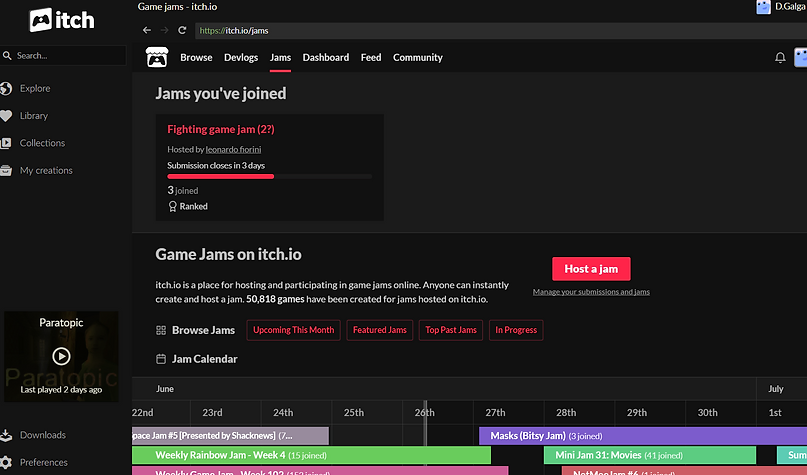
I noticed this "Fighting game jam" while messing around with the new Itch game launcher. I was curious if the launcher simply allowed for making and tracking game purchases, or if it would also let you track and join jams.

The Itch game launcher lets you track and join game jams. I'm still a little psyched about it.
As you can see, I joined that Fighting game jam instead of working on the Ghost game. I did this because I'm more confident in my current Godot skills then I've ever been in my Unity skills. I did this because of the strict time limit (3 days left, gak!). I did this because I won't need to program for online play. And, most of all, I did this because I've always wanted to make some kind of fighting game.

My starting point was simple, and is based on an idea I've had for a while: Knights fighting each other in full armor with swords. The gameplay hook would be players maneuvering themselves and their swords to strike at weak points while deflecting their opponents blows with armor-shod limbs.

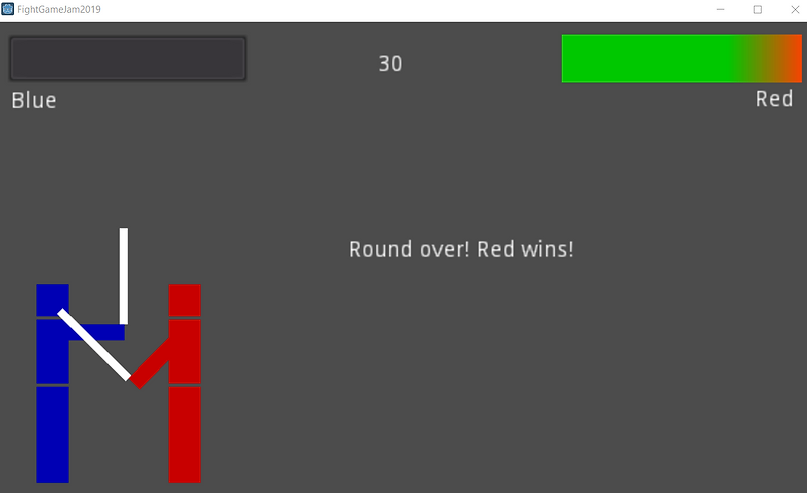
I realized, extremely quickly, that I don't currently have the time or the skills to make fighting in armor fun. However, I was able to modify the idea. I now have a red dude and a blue dude with sticks:

I need to get the timer, a reset condition, and round tracking done before next Saturday. I'm also really hoping to have time to add more attack animations (the basic *thwack* above isn't doing much for me).

Wish me luck!


7/2/19:

So, per my last post, I joined a week long game jam creatively titled "Fighting game jam (2?)". I found and joined the jam a full day late. Normally, I would not do or encourage this. However, in this case, I happened to have an idea a few days prior that I could easily plan out as a fighting game. For more details on all that, check out my previous post. Today's post is gonna be long enough as it is.

I was informed last week that my board game prototype, FTR, is going to be streamed on July 7th. I plan to post on Twitter and Facebook and briefly here on the day of the stream with a link to it, and then follow up with a full post the following week. I'll probably switch gears back to working on FTR as my full time project. I'm expecting a return to board game design to feel like whiplash after everything I've done and learned this past week, and it's my hope that posting a full breakdown of my jam game will lessen the effect. It probably won't.

Here's the end result of my design (the only submission to the jam, which is disappointing):
https://dgalga.itch.io/red-bop-blue

My goals for Red Bop Blue were as follows:
  • Local-only 1v1.
  • "Family friendly" per the jam rules.
  • 2 onscreen characters composed of "programmer art" (blocks or poor sketches of characters with primitive animations).
  • Avoid using paint programs (GIMP, Krita, etc) as much as possible; stick to Godot tools.
  • 1 to 4 moves for each character.
  • 1 stage.
  • Lifebars for both characters.
  • A win counter for both characters.
  • All damage tied to the character's weapons.
  • A way for swords to clash or block each other.
As you can see, I achieved all of this and more:

The outcome of all of my effort isn't fancy, and is very broken, and I learned alot in making it. What follows is a breakdown of what I learned with my code.

Section 1: Skeleton

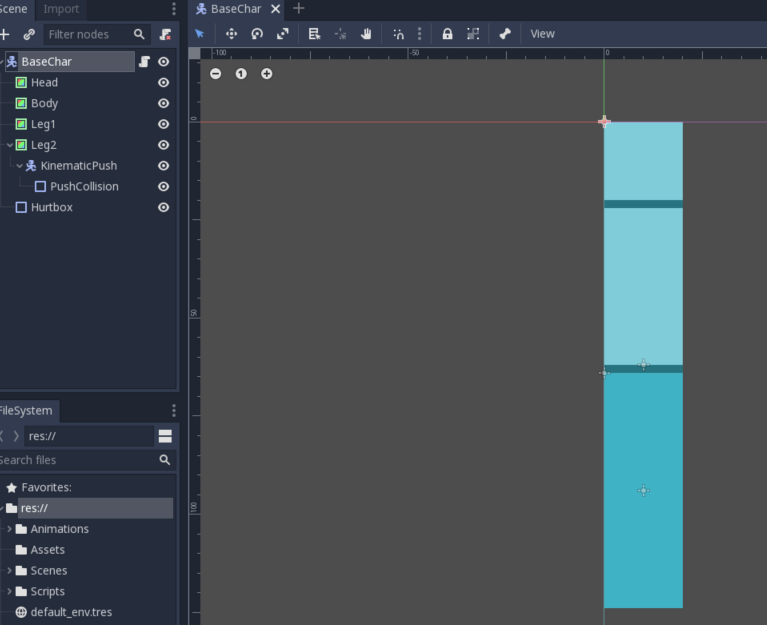
My current favorite thing about Godot is the instancing and scene structure. Making, working on, and importing multiple scenes at a time is something I'm quickly getting used to. I used this approach to construct a baseline character, or a character all others will contain attributes of, with a baseline script that will extend to all other characters:

As you can see, the basic character is composed of ColorRect, KinematicBody2D, and Collision2D nodes. The ColorRect nodes, which are literally just blocks of color, were part of an effort to see how much I can prototype in Godot without needing to use a paint program.

Having the ability to speedily test ideas is something I value highly in an engine. Making assets takes time and, unless said assets are demanded by the design of the game, is something I try to avoid as much as possible in the early stages of a design.

Most engines have some simple pre-built assets. Unity has a number of 3D objects to choose from, for example. Godot is the first engine I've encountered to incorporate an easy 2D color block, and I found the ColorRect node to be easier to prototype with over Unity's 3D blocks and spheres.

Returning to the basic character, the script I used was short and sweet:
extends KinematicBody2D
const MOVE_SPEED = 150
const SWORD_ALIGN_SPEED = 50
const SWORD_LIMIT = 200
These are the values for all character move speed, character sword movement up and down speed, and the limit for how far a character's arm can move up or down.

The second basic object I worked on was the sword. I only need 1, since both characters would be using the same one. Surprisingly, the sword turned into the biggest headache of the whole project.

An issue I have with Godot is that only Sprites, or the ColorRect in this case (it's classified as a sprite), allow for pivot rotation point adjustment on import to other scenes. This is why Blue's sword rotates differently than Red's. The pivot point for the sword is at the top left of the object (that little orange cross), and I simply rotated Red and Blue's swords so that the pivot point is touching Red and Blue's arms. Red and Blue are facing opposite directions, so the rotation in animations is altered to be overhand for Red and underhand for Blue.

In the end, I decided it was more important to import the sword as an Area2D node so I could access the associated Area2D signals to speed up development. With more time, I would've had more reason to try and find a solution that allowed the swords to always rotate the same direction.

If you don't know what Godot signals are, think of them as special scripting components. They help to establish a relationship between the origin of a signal and the script you're using it in, without you needing to code in any awareness between the objects of each other. I don't know of any way to use signals between scenes. I've only ever gotten them to work between objects that are in the same scene.

The script I used for the sword was a little more complex than the base character script:
extends Area2D

var obj_name

func _on_body_entered(body): #check for any player entering damage area and pass back to gamestate to resolve
obj_name = body.get_name()
Global.gameState.resolve_dmg(obj_name)

func _on_Sword_area_entered(area): #check for swords crossed
if area.name == "SwordTemp":
Global.swords_crossed = true

func _on_Sword_area_exited(area): #check for swords uncrossed
Global.swords_crossed = false

The full script has connections to scripts that I haven't even mentioned yet. Global is just a storage space that all other scripts are aware of. No processing happens in Global, but scripts can make calls to Global to reference other objects or scripts that would otherwise be invisible due to the scripts/objects existing in different scenes. However, there's still enough here to detail what the sword was supposed to be doing:
  • All damage was handled through sword collision. If the sword collides with a physics body (either player), it gets the name of the player and passes it back to a script that tracks the overall state of the game. The gameState script then deducts health appropriately.
  • As an Area2D object, the sword itself is not a physics object. So, in order to interact with itself for sword crossing/blocking/etc events, the sword has to check for collisions with "area" nodes. The area entered and exit nodes simply check if the sword has collided with another version of itself, and then if it's stopped colliding with a version of itself.
After creating the base character and the sword, I created a scene for the main stage. The main stage is literally just a container for other objects to be imported into, and there's not much to say about it as a result.

Section 2: The Players

I didn't make the player characters the way I imagine a professional-level fighting game would make then: build 1 character off of an import of the base character scene, and then import the character twice into the main scene to serve as player 1 and player 2. I didn't believe I would be able to figure this out easily and within the time alotted, so I didn't even try.

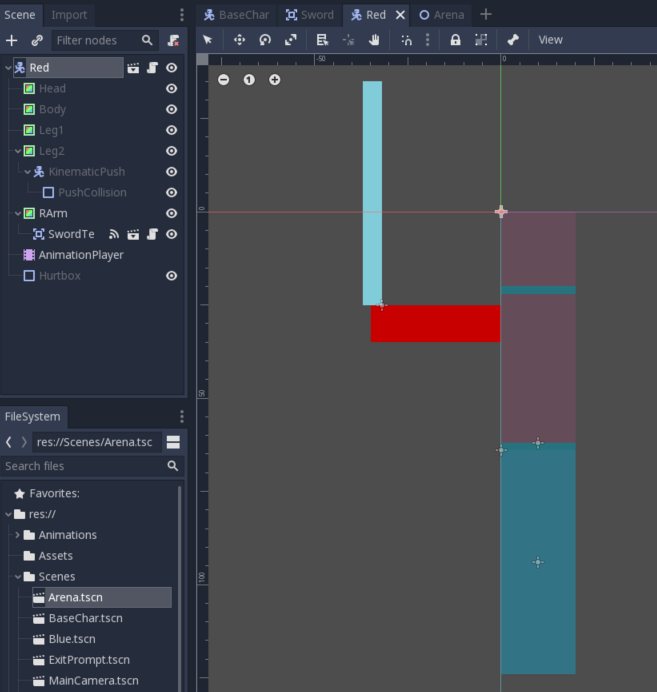
Instead, I manually built a player 1 scene, and player 2 scene, and called them Blue and Red.

All of the scripts on Red and Blue are exactly the same save for the animations, which I couldn't find a way to copy. The only real difference between them is that I started and finished Red first.
The greyed out nodes in the image above are everything I imported from the base character scene. The additions for each character are clear: Red and Blue each have their own arm, an AnimationPlayer node, and a separate instance of the sword.

Speaking of the AnimationPlayer, guess what the 2nd biggest headache in making the game was?
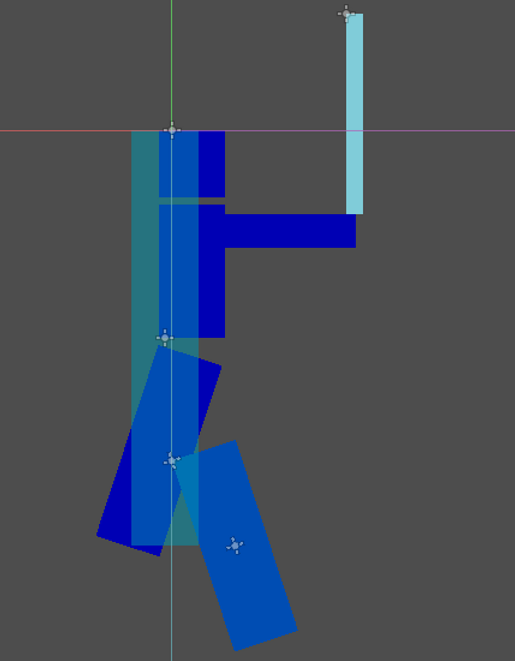
Godot has built in animation system which, combined with the ColorRect nodes, saved me alot of time I would otherwise have had to spend making custom sprites. That being said, the existing animation system is not perfect.

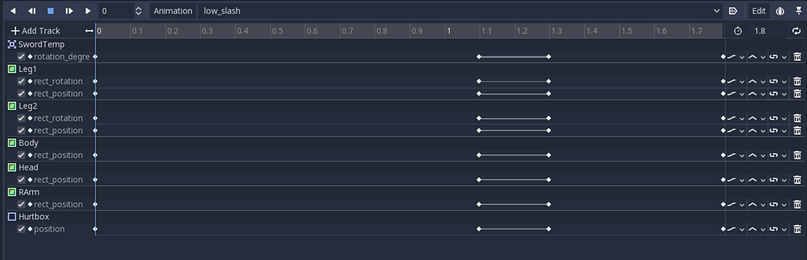
For starters, the animation system doesn't like collision nodes. Both players have 1 leg with a collision box on it as part of a quick and dirty "get off me!" kick move. That leg, as you can see above and in the video gameplay, breaks constantly.

If you're only moving sprites around, or if you have only very basic movements/needs for the Godot animation system, it's perfect. However, if you have a sequence that requires alot of moving pieces, like this:
Anyhoo, on to the player scripts:
extends "res://Scripts/BaseChar.gd"

var velocity = Vector2()
var ori_screen_size
var keep_onscreen
onready var P2Arm = $RArm

func _ready():
ori_screen_size = get_viewport_rect().size
keep_onscreen = ori_screen_size.x/4 #The screen is 1024, but the game doesn't handle things as such

func _physics_process(delta):
update_move(delta)
update_sword(delta)
move_and_slide(velocity)
self.position.x = clamp(position.x,-keep_onscreen,keep_onscreen) #-220,220) these are the values I had to set to figure out how to keep the player object onscreen... weird
self.position.y = 2

func update_move(delta): #players normally move only L and R
if Input.is_action_pressed('ui_p2_right') and not Input.is_action_pressed("ui_p2_strikemod"):
velocity.x = MOVE_SPEED
elif Input.is_action_pressed('ui_p2_left') and not Input.is_action_pressed("ui_p2_strikemod") and not Global.swords_crossed:
velocity.x = -MOVE_SPEED
else:
velocity.x = 0

func update_sword(delta): #rotate sword up and down
var sword_rot = P2Arm.get_rotation()
if Input.is_action_pressed("ui_p2_swordup") and sword_rot > -SWORD_LIMIT:
sword_rot = sword_rot - (SWORD_ALIGN_SPEED/2)
P2Arm.set_rotation(sword_rot)
elif Input.is_action_pressed("ui_p2_sworddown") and sword_rot < SWORD_LIMIT:
sword_rot = sword_rot + (SWORD_ALIGN_SPEED/2)
P2Arm.set_rotation(sword_rot)
if Input.is_action_pressed("ui_p2_strikemod") and Input.is_action_pressed("ui_p2_right"):
$AnimationPlayer.play("str_slash")
elif Input.is_action_pressed("ui_p2_strikemod") and Input.is_action_pressed("ui_p2_left"):
$AnimationPlayer.play("forward_stab")
elif Input.is_action_pressed("ui_p2_strikemod") and Input.is_action_pressed("ui_p2_swordup"):
$AnimationPlayer.play("kick")
elif Input.is_action_pressed("ui_p2_strikemod") and Input.is_action_pressed("ui_p2_sworddown"):
$AnimationPlayer.play("low_slash")

There's alot going on here, so I'm going to break it down by function:
  • _ready(): In this function, we are getting the current screensize so I can always have the player onscreen. I was surprised at how difficult this was to figure out. Unity screen limiting can be simple X and Y values, but in Godot I have to divide by 4 to even get close to what I want.
  • _physics_process(delta): This is calling my custom functions to be updated every physics frame (only on the frames when physics is processed versus normal delta-bound processing), moves the player according to passed values, continuing to ensure the player is locked onscreen, and locking down the Y value for the player. Some animations at certain angles physically move the player up and down and, as there's no way for the player to compensate, I came up with self.position.y as a quick and dirty solution.
  • update_move(delta): Sets the values that move the player according to the time values passed down from _physics_process(delta). Player input is read, and you move right, left, or stop. If swords are touching, you cannot move forward (only back).
  • update_sword(delta): This function rotates the player's arms up or down, and initiates attack animations if the correct movement button is pressed while the attack modifier button is held down.
All of the above is fairly standard, which was perfect for this project. Figuring out a turn-based movement system, for example, would probably not be something I could figure out in 1 week with my current skills.

Section 3: The UI

The UI system was where my existing skills were tested the most. The UI amounts to 1 entire scene built around the game camera:
What we got in this scene:
  • Healthbars for Red and Blue that use a color gradient to symbolize reductions in health.
  • Various Label nodes to provide text feedback to the player (number of wins, whose health is whose, a round timer).
  • A timer for the round (and that will end the round if the timer runs out) and a timer to allow for enough processing time to pass when a round ends. I had some issues early on with wins being recorded incorrectly, or not be recorded at all, and through testing I found that a 1 to 2 second timer helped avoid this issue completely.
  • An exit prompt. This was added when I realized I had a few hours before the game was due, and was supposed to be little more than a quick and dirty way to quit the game. Oh, it became a headache, believe me.
And now, for the piece de restroom that tied everything together, the gamestate script!
extends Area2D

var screen_size
var gameState
var blue_wins = 0
var red_wins = 0
var swords_crossed = false

Gotcha! That's the Global script! This is the gamestate script:
extends Node

onready var P1Life = $P1Healthbar
onready var P2Life = $P2Healthbar
onready var EndText = $GameOver #hidden text that appears when someone wins
onready var RoundTime = $RoundTimer #timer node in scene
onready var VisibleTime = $VisualTimer #Clock the player sees
onready var ResetTimer = $Reset

var player_life_start = 30 #all player life the same
var player1_life
var player2_life
var update_time_track = 60 #amount of time in the round

var cur_dmg = 10 #all attacks do the same dmg

func _ready():
Global.gameState = self
EndText.visible = false
VisibleTime.text = str(update_time_track)
P1Life.max_value = player_life_start
P2Life.max_value = player_life_start
player1_life = player_life_start
player2_life = player_life_start
update_life()
$BlueWins.text = "Wins: " + str(Global.blue_wins)
$RedWins.text = " Wins: " + str(Global.red_wins)

func _input(event): #spawn the popup to exit the game & manage in-game pausing
if event.is_action_pressed("ui_cancel"):
if $ExitPrompt.visible:
$ExitPrompt.visible = false
else:
$ExitPrompt.visible = true
get_tree().paused = !get_tree().paused

func resolve_dmg(name): #since all damage is currently the same, just resolve damage all in this function
#This is how switchcase works in Godot! Adding here in case, idk, I ever want to have more characters.
match name:
"Red":
player2_life -= cur_dmg #calculate changes to healthbars
update_life()
"Blue":
player1_life -= cur_dmg
update_life()

func update_life(): #update healthbars & confirm if win. Elifs don't work for double-KO.
var dual_ko_check = 0
if player1_life > 0:
P1Life.value = player1_life
else:
P1Life.value = 0 #ensures lifebar goes down alla way (won't otherwise)
dual_ko_check += 1
ResetTimer.start()
ko_check(dual_ko_check)
if player2_life > 0:
P2Life.value = player2_life
else:
P2Life.value = 0
dual_ko_check += 2
ResetTimer.start()
ko_check(dual_ko_check)

func ko_check(ko_var): #check how KO occured, and calculate points + reveal winner in text
match ko_var:
1:
get_tree().paused = true #adding pause under the KO check function avoids further damage
EndText.visible = true
EndText.text = "Round over! Red wins!"
Global.red_wins += 1
2:
get_tree().paused = true
EndText.visible = true
EndText.text = "Round over! Blue wins!"
Global.blue_wins += 1
3:
get_tree().paused = true
EndText.visible = true
EndText.text = "Dual KO!" #don't set points here, because the previous switches will trigger and both players already get +1 as a result

func reset_arena(): #reset scene for additional play
get_tree().reload_current_scene()

func _on_RoundTimer_timeout(): #using a signal from the timer to confirm when it runs out
update_time_track -= 1 #need a variable to increment, as it appears you cannot increment off the timer itself
VisibleTime.text = str(update_time_track) #update the clock the player sees.
if update_time_track == 0:
get_tree().paused = true
if player1_life > player2_life:
EndText.visible = true
EndText.text = "Timeout! Blue wins this round!"
Global.blue_wins += 1
ResetTimer.start()
if player2_life > player1_life:
EndText.visible = true
EndText.text = "Timeout! Red wins this round!"
Global.red_wins += 1
ResetTimer.start()
if player1_life == player2_life:
EndText.visible = true
EndText.text = "Timeout! Tie!"
ResetTimer.start()

func _on_Reset_timeout(): #reset game after providing enough time to get everything sorted.
get_tree().paused = false
reset_arena()

func _on_ExitPrompt_visibility_changed(): #this is the only thing I found to unpause when the dialogue is closed through Cancel or X
if !$ExitPrompt.visible:
get_tree().paused = false

Eyes glazing over? Don't worry, mine are alittle, too. There's alot to process here. Let me break it down:
  • _ready(): First, we gotta let the Global script know who the gamestate is, so that happens here. Next is all just making sure everything is set to the default it's supposed to: Healthbars set to full, pulling the current win count from Global (Global persists between wins/restarts) and ensuring the win counts are up to date, etc.
  • _input(event): Did you press the Esc key? Pause the game and pop up the quit menu. Which, turns out pausing the game is really easy (versus Unity, where I still don't know how to pause). All you needed is get_tree().paused = [true for paused or false for unpaused]. The official documentation is actually really useful here for the curious: https://docs.godotengine.org/en/3.1/tutorials/misc/pausing_games.html
  • resolve_dmg(name): This function modifies healthbars by comparing the name returned from the sword script to the "Red" and "Blue" strings. This is also my first attempt at making a switchcase in Godot and, I gotta say, I vastly prefer matchcase over the C# switchcase structure. That much less muss/fuss.
  • update_life(): Literally what the name implies. It updates lifebars and checks for a potential KO.
  • ko_check(ko_var): It's absurdly easy to get a double KO in Red Bop Blue. This whole function exists because my existing code was not handling the result well. Red or Blue would get a point, or sometimes double points. I don't recall exactly, but I hated the result. So, I stripped my existing KO code out of update_life() and isolated it all to ko_check until the current solution was found. Currently, those who get KOs get points which carry over to later rounds. Also, 2nd match catch. I definitely like these things.
  • reset_arena(): Does what it says; if someone gets a KO, or if time runs out, this function resets the entire scene back to how it was at the start of the game.
  • _on_RoundTimer_timeout(): This function is actually a signal from the RoundTimer node. Timers work a little oddly in Godot, by which I mean the RoundTimer isn't actually the clock for the match. The variable update_time_track is. What RoundTimer does is, every time it expires (every second), update_time_track is decreased by 1 and then used to update the VisualTimer Label that players actually see while playing. Wacky, right? The rest of the code in this function is about handling timeouts.
  • _on_Reset_timeout(): This function is another signal, this time from the Reset timer node, and exists to solve 2 problems: The game failing to update correctly when a round ends, and to unpause the game before it gets reset. I had to pause the game when someone reached 0 health, as it was possible to continue scoring while an opponent was at 0 before the scene reset, but resetting the scene doesn't unpause the game!
  • _on_ExitPrompt_visibility_changed(): The final function in my code, this signal originates from the ExitPrompt, and represents the only solution I found for if a player clicks cancel or the X on the ExitPrompt AcceptDialogue node. See, AcceptDialogue nodes have easy code for if you click OK. Programming a function for when you do anything else gets alot murkier, though. So, this function checks if the ExitPrompt is hidden, but only when the visibility of the object changes, and then unpauses the game if true.

Woof, that was a lot to go over. Here's the ExitPrompt code, if anyone's curious:
extends ConfirmationDialog

func _on_ExitPrompt_confirmed():
get_tree().quit()

That's it. That's not necessarily everything I learned or made for the project, but that's all I'm going over from it. I hope it's useful to someone. I recall trying to find an example fighting game project when I was working in Unity, and never finding anything this detailed.

Next week is back to FTR and physical game design. And much, much shorter posting. Until then.
 

Piecemeal Jack - post 4 - wrap up

 I'm calling it quits on Piecemeal Jack for now. This is as far as I got: I built everything I had planned, to some extent, and the resu...